


AirNav Radar – Flight Tracker
4.4166.00 Reviews
App Specs
- Version
- 3.4.10
- Updated On
- License
- Free
- Downloads
- 1,000,000+
- Developer
- AirNav Systems
- Categories
- Travel & Local
- Platform
- Android, iOS
Screenshots


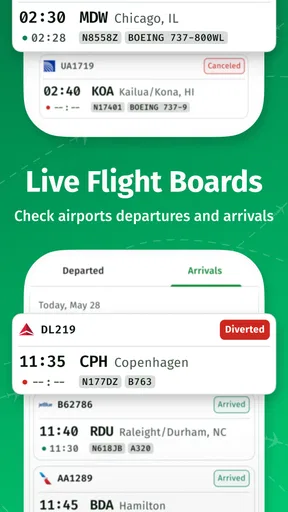

 Analysis by AppCompare
I like flight trackers most when they turn a passing plane into something I can actually investigate. AirNav Radar – Flight Tracker is built around that simple curiosity: open the map, find an aircraft, and follow its progress rather than just guessing where it is headed. I find that useful both for casual sky-watching and for practical moments, such as checking whether a flight I’m meeting is still on its way.
A live map that makes aircraft the focus
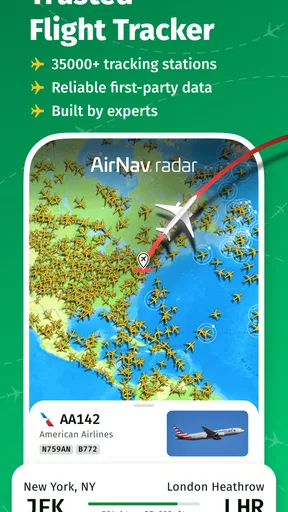
The central experience is a map populated with flights. Instead of starting with a list of airport departures, I can look at the airspace around a place and choose a plane that catches my eye. Tapping an aircraft brings up flight details, so the map works as more than a moving display: it gives me a starting point for understanding what I’m seeing.
That map-first approach is the app’s clearest strength. A conventional airline app is better when I already know the airline and flight number and need information about that one trip. A general map app is better for roads and directions. Here, the point is to explore aircraft activity itself. I can begin with a plane overhead, an airport, or an area I’m curious about, then follow the information from there.
There is a small but important distinction between watching and planning. I use this kind of tracker to get a sense of a flight’s progress, not as a substitute for an airline’s official travel updates or airport announcements. When a connection, pickup, or gate decision depends on exact operational information, I check the relevant airline or airport source as well. It is most useful as a clear view of aircraft movement, not as a promise that every travel detail is settled.
Getting Started with AirNav Radar
First things first, let's talk about the initial setup. Downloading AirNav Radar – Flight Tracker from the app store was a breeze. The app is available for both Android and iOS, so no matter your device preference, you’re covered. I was up and running in no time, which is great because I couldn’t wait to dive into the flight-tracking experience.
Once you open the app, you're greeted by a sleek and intuitive interface. It’s like having a mini control tower in your pocket! The home screen showcases a live map of flights around the world. You can pinch to zoom in and out, navigating through bustling airspaces with ease. The app’s design is not just visually appealing but also user-friendly, making it accessible for aviation enthusiasts of all levels.
Features That Soar
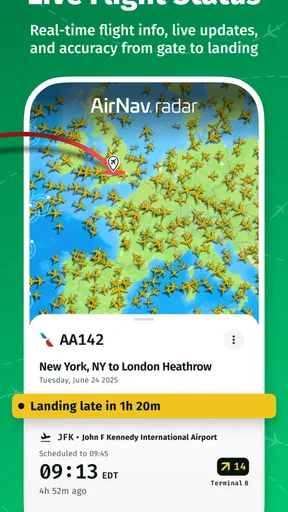
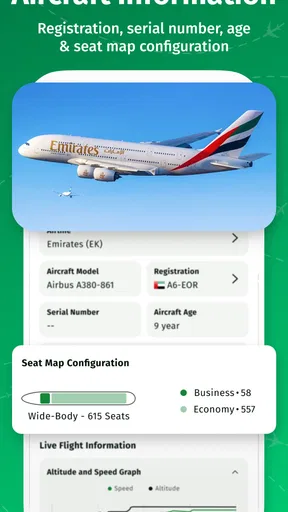
Now, let's get into the nitty-gritty of what makes this app a must-have for flight tracking. The real-time tracking feature is a standout. You can click on any plane icon on the map and instantly get a wealth of information: flight number, airline, origin, destination, altitude, speed, and even the aircraft type. It's like having a VIP pass to the cockpit!
Worth Reading Before You Choose

Flipboard Shows What News Apps Must Do Beyond the Feed

Switching to Android Auto Means Rethinking Your Driving Routine

Google Calendar Makes a Crowded Week Easier to Manage

Ludo King Makes the Most of the Minutes Between Plans

Baby Panda World Brings Quick Play to Modern Phones, but Its Game Library Feels Busy

ESPN’s Live Game View Makes Following Close Games Easier
One of my favorite features is the augmented reality (AR) mode. By simply pointing your phone at the sky, the app overlays the details of planes flying overhead onto your screen. It’s a bit like Pokémon Go, but with airplanes. This feature adds a fun, interactive element that really brings the experience to life.
The app also offers customized alerts. Want to know when Grandma's flight is landing? Set an alert and you’ll get a notification when her plane is approaching the airport. It’s perfect for frequent travelers and those picking up friends and family from the airport.
Making the map useful day to day
For a pickup, I would start by selecting the arriving flight and use its progress to decide when to leave, rather than setting off based only on the scheduled arrival time. That can help avoid waiting around if the aircraft is still en route. I would still check the airport’s own arrival information before changing plans, because a live aircraft position does not tell me everything about baggage, gate changes, or the time it takes passengers to reach the curb.
For sky-watching, the useful habit is to zoom in gradually. A crowded wide-area view can feel like a wall of symbols, while a closer view makes it easier to pick one aircraft and inspect its details. If I’m outside with the AR view, I treat it as a way to connect the screen with the plane I can see, not as a replacement for checking the map. Bright light, a moving viewpoint, or several aircraft in the same direction can make matching a symbol to a specific plane less straightforward.
Those workflows also answer a common practical question: do I need to know a flight number before opening the app? Not for browsing the map; choosing an aircraft is part of the experience. A flight number is more useful when I’m trying to follow a particular person’s journey and want to make sure I have selected the right aircraft. For a pickup, I would use both the flight details and the airport’s own updates rather than relying on a single screen.
Exploring the Extras
Besides the core tracking capabilities, AirNav Radar packs in some cool extras. There’s a historical flight data feature, allowing you to look back on past flights. This is particularly useful for aviation geeks who like to analyze flight patterns and trends over time.
Another sweet addition is the weather overlay. You can toggle it on to see current weather conditions along the flight paths. It’s a handy tool for understanding how weather impacts flights, adding another layer of depth to the app.
The overlay is most valuable as context, not as a verdict on what a flight will do. When I see weather near a route, I take it as a reason to look more closely at the flight, not as proof of a delay or diversion. Similarly, historical flight views make more sense when I have a specific question in mind, such as whether a route tends to follow a similar corridor. Browsing old tracks without a question can become a lot of map-watching without much to learn.
Who benefits most, and where it can feel limited
This is a Travel & Local app from AirNav Systems, and its appeal reaches beyond people who fly often. Plane spotters can use the map and AR mode to connect aircraft overhead with flight details; curious families can turn a passing plane into a short shared activity; and travelers can keep an eye on a flight they are meeting. The app is free to install, has an Everyone age rating, and its current version is 3.2.5. It has a 4.4 average from around 6,200 ratings and more than a million installs, so it has found a broad audience without needing to be a specialist aviation tool.
There are trade-offs. A live map is visually busy in active airspace, and a new user may need a little time to learn how much to zoom and which aircraft details matter. AR is entertaining, but it is less useful indoors or when it is difficult to identify the plane in the sky. I also would not choose this as my only source for time-critical travel decisions. Someone who only wants a simple “arrived” message may find an airline’s own app easier, while someone who wants driving directions to an airport needs a navigation app instead.
The app is free, but in-app purchases range from $2.99 to $599.99 per item. That is a broad spread, so I would explore the free experience first and consider a purchase only if I can name a particular capability I need. A casual user who checks a few flights or looks up planes overhead may have no reason to spend anything. Someone who uses the app regularly should inspect the purchase details in the app before committing, rather than assuming every useful-looking option is part of the free version.
Why You'll Love It
This app is a dream come true for aviation fans, but it’s also incredibly useful for everyday users. Whether you’re tracking a loved one’s flight or just satisfying your inner airplane nerd, AirNav Radar delivers. It combines functionality with a touch of magic, making every flight feel like an adventure.
And let's not forget about the global coverage. The app tracks flights from all over the world, so whether you're interested in domestic flights or international expeditions, you’ll find it all here. The developers have truly thought of everything, ensuring that no plane goes unnoticed.
For me, the best reason to keep it installed is that it answers a question ordinary maps do not: what is moving through the sky above this place right now? If I only need a single airline’s status page, that simpler option may be quicker. If I want to browse nearby aircraft, compare what I see overhead with the map, or follow a flight’s progress while waiting for someone, this app is the more engaging choice.
The Final Approach
In conclusion, AirNav Radar – Flight Tracker is more than just a flight tracking app; it’s a gateway to the skies. With its user-friendly interface, robust features, and the added fun of augmented reality, it’s an app that keeps on giving. Whether you're an aviation enthusiast or just someone who likes to keep tabs on flights, this app is worth checking out.
If you haven’t already, head over to your app store and give it a whirl. Trust me, once you start tracking flights with AirNav Radar – Flight Tracker, you'll never look at the sky the same way again. Happy tracking!
Pros
- Intuitive user interface for easy navigation.
- Real-time flight tracking with detailed data.
- Customizable alerts for specific flights.
- Global coverage with extensive airport database.
- Weather overlay for enhanced flight details.
Cons
- Requires a stable internet connection.
- Limited features in the free version.
- Occasional lag in live updates.
- High battery consumption during use.
- In-app purchases can be pricey.
FAQs for AirNav Radar – Flight Tracker
What is AirNav Radar – Flight Tracker, and how does it work?
AirNav Radar – Flight Tracker is an app designed to provide real-time flight tracking information. It allows users to monitor aircraft movements globally with detailed information on flight paths, altitudes, and speeds. The app uses ADS-B (Automatic Dependent Surveillance–Broadcast) data collected from planes equipped with this technology, ensuring accurate and up-to-date information.
Is AirNav Radar – Flight Tracker free to use?
AirNav Radar – Flight Tracker offers both a free version and a premium subscription. The free version provides basic flight tracking features, while the premium version offers enhanced functionalities such as more detailed flight data, no ads, and additional customization options. Users can choose the subscription plan that best suits their needs.
Can I use AirNav Radar – Flight Tracker offline?
No, AirNav Radar – Flight Tracker requires an active internet connection to function. This is because the app relies on real-time data from the ADS-B network and other sources for accurate flight tracking. Offline use is not possible as the app needs continuous access to live data streams.
How accurate is the flight tracking information provided by AirNav Radar?
The flight tracking information on AirNav Radar is highly accurate, thanks to its reliance on ADS-B technology. However, the accuracy can vary depending on the region and the availability of data sources. In areas with comprehensive ADS-B coverage, users can expect precise and up-to-date information.
Does AirNav Radar – Flight Tracker work globally?
Yes, AirNav Radar – Flight Tracker is designed to work on a global scale. It provides flight tracking information for flights worldwide, as long as the aircraft are equipped with ADS-B technology. Some remote areas might have limited coverage, but the app covers most major flight routes and regions effectively.


